
Moving a WordPress website to another host is not just a matter of copying pages. The visible site may be only one part of the setup. Its database, uploaded files, domain settings, business email, forms, backups and connected services all have to keep working after the move.
Before changing DNS or canceling an old hosting account, make a written cutover plan. A careful move usually has three phases: copy and test the site, switch traffic deliberately, and verify that customers can still use it. Here is a practical pre-migration checklist for a small business that wants to avoid surprises.
First, decide exactly what is moving
Are you moving the existing WordPress installation to a different web server while keeping the same domain? Are you also changing domain registrars, DNS providers or email providers? Those are separate projects, even when one company currently handles all of them.
If the public domain and site URLs are staying the same, the migration may be simpler than a redesign or domain change. The WordPress migration documentation explains that a move to a new server begins with the website files and database. It also distinguishes moves that preserve the public URLs from those that change them.
Write down the scope in one sentence: “We are moving the existing site and database to a new host, keeping the domain and email provider unchanged.” If that sentence is not accurate, list the other changes explicitly. This prevents a routine hosting move from quietly turning into a domain, mailbox and website rebuild at once.
Collect access before anyone touches the live site
Confirm who can authorize and access the domain registrar, DNS zone, current host, destination host, WordPress administrator account, backups and any security or CDN service. Check that the appropriate people can complete multifactor authentication and that recovery contact information is current.
Do not send passwords around in an email thread. Use a secure credential-sharing method and give the migration team only the permissions it needs. Our website ownership and access guide covers the broader question of which accounts a business should control. For this migration, the immediate goal is to confirm that every required account is actually reachable before scheduling a cutover.
Also identify the current site’s dependencies: premium theme or plugin licenses, custom code, scheduled tasks, forms, payment systems, booking tools, external databases, SMTP services, caching, security rules and analytics tags. A new host may support WordPress but still require configuration changes for some of those features.
Make a complete backup—and know how to restore it
A WordPress backup should cover the database and the relevant files, including media uploads, themes, plugins and custom configuration. A content-only export is not necessarily a full website backup. Record when the backup was taken, where it is stored, who can access it and how long the old environment will remain available.
Ask the person performing the move to verify that the backup can actually be restored to a test environment. A downloadable archive is reassuring, but a successful restore test is much stronger evidence. If the site accepts orders, registrations, comments or form submissions, agree on how new data will be handled between the final backup and DNS cutover. Otherwise, late submissions could remain on the old server.
Do not delete the old installation as soon as the new homepage loads. Keep a rollback option until the destination has passed meaningful tests and the migration window is closed.
Protect business email and domain records
One of the easiest mistakes is treating the domain’s DNS settings as though they only control the website. DNS may also direct business email and verify third-party services. Before changing nameservers or website address records, export or document the current zone: A and AAAA records, CNAMEs, MX records, SPF, DKIM, DMARC, relevant TXT records and any service-specific subdomains.
If email is hosted separately, moving the website should not automatically require moving the mailboxes. The Cloudflare email troubleshooting guide explains why missing or incorrect MX and authentication records can disrupt delivery. Preserve the actual values required by your email provider rather than copying example values from an article.
Confirm where authoritative DNS is managed. A nameserver change can replace the entire active DNS zone, whereas changing a website A record is a narrower operation. If DNSSEC, a CDN or a proxy is involved, include those dependencies in the plan. Never assume that “the domain stayed the same” means email and connected services are protected.
Build and test the destination before the switch
Copy the site into a staging or temporary environment on the destination host. Restrict public access and avoid accidentally allowing search engines to index a duplicate site. Check that the new environment supports the required PHP version, database version, memory limits, HTTPS, scheduled jobs and plugin or theme requirements.
Test the site as a customer would, not just as an administrator. Open important service pages and mobile layouts. Check images, menus, search, forms, file downloads, login areas, redirects, contact buttons and any checkout or appointment process. Submit a clearly labeled test form and confirm both the success message and the actual notification delivery. Do not count a test as a customer inquiry.
For businesses with customized WordPress functionality, our WordPress development and support services address the plugin, theme, integration and troubleshooting work that may need careful attention during a transition. A migration should preserve working functionality rather than becoming an excuse to replace everything.
Use a written go/no-go checklist
Before the planned cutover, the owner or responsible technician should be able to answer each of these questions with evidence—not a hopeful assumption:
- Recoverability: Is there a current complete backup, and has a restore or equivalent recovery path been tested?
- Ownership: Can authorized people access both hosts and the active DNS provider without waiting for a former vendor?
- Functionality: Have the highest-value customer paths, forms and connected systems been tested on the destination?
- Email continuity: Are the active mail and authentication records documented, with a plan to preserve them?
- Cutover: Is there a named person responsible for the DNS change, verification and communication?
- Rollback: Is the old site still available, and is there a clear point at which the team would reverse the change?
If the backup cannot be restored, the team lacks DNS access, or a business-critical form fails on staging, postpone the cutover. A new hosting invoice is not a reason to take an avoidable operational risk. If a low-priority cosmetic detail remains, document it and decide whether it genuinely prevents launch.
Plan the cutover around real business activity
Choose a time when a short disruption would be least damaging, and tell the people who handle customer inquiries what to expect. Where appropriate, lower relevant DNS time-to-live settings ahead of the move, understanding that existing caches may not update instantly. Agree on a final content and database synchronization process so recent orders or submissions are not lost.
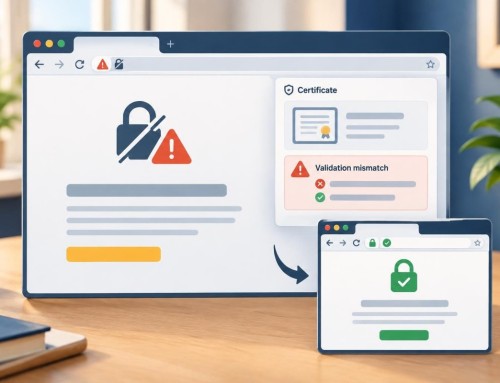
When the new site is ready, update only the required DNS or hosting configuration, then check the live domain from more than one network or device. Confirm the HTTPS certificate, correct pages, redirects, contact forms, outgoing email, incoming business email and any payment or booking path. Check server logs and error reports rather than relying solely on a successful homepage view.
Keep a record of the old and new server details, DNS changes, timestamps, test results and the person who approved the cutover. This small change log can save considerable confusion if something behaves differently after the move.
After launch, verify before canceling the old host
Monitor the website and actual customer contact paths through a reasonable stabilization period. Check for broken internal links, missing media, mixed-content warnings, unexpected redirects, failed scheduled tasks and forms that appear to submit but do not deliver notifications. Confirm analytics and Search Console are still receiving data when their normal reporting delays allow; do not interpret a few hours of missing data as proof of lost search rankings.
If the public URLs changed, the project also needs a deliberate redirect and search-visibility plan. If they did not change, do not manufacture new URLs merely because the hosting provider changed. Review backups and security settings on the destination, and confirm who will maintain the site going forward.
Our hosting, maintenance and ongoing support work focuses on keeping the website usable after the technical handoff—not just getting it online once.
A successful move is one customers barely notice
The right outcome is not simply “the site loads on the new server.” It is that the business retains control of its domain and data, customers can still reach it, critical workflows continue, and someone knows how to recover if a problem appears. The checklist above gives you a way to judge readiness before you take the risk.
If you are planning a WordPress hosting move and want a clear scope, risk review or hands-on technical support, request a Discovery Call with Grassroots Consulting. We can help determine what should move, what should stay put and what needs testing first.
Built in collaboration with ChatGPT.